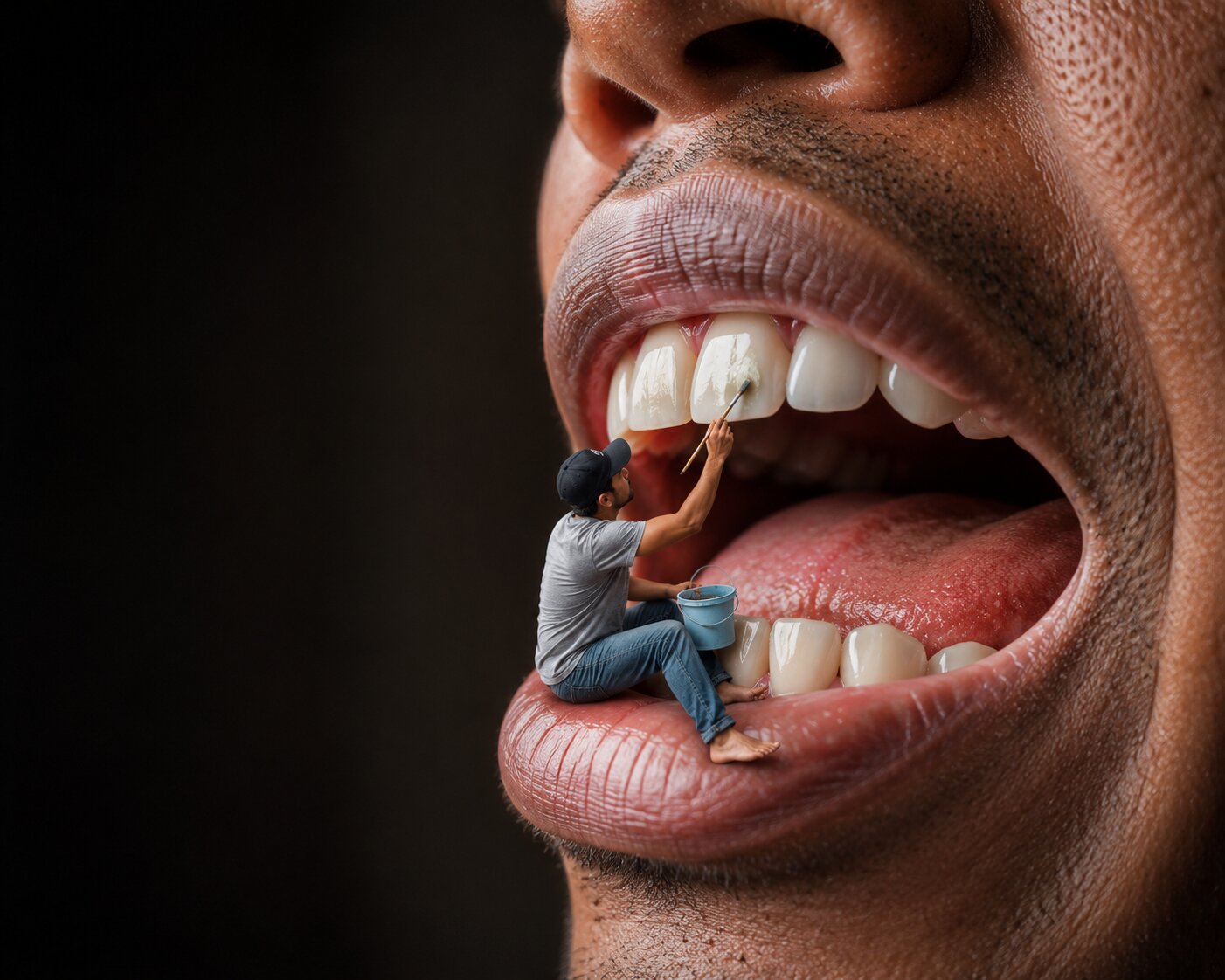
Tiny Tooth Painter Inside a Giant Mouth
How to Create a Custom Surreal Photomanipulation
Creating a custom surreal photomanipulation starts by choosing a giant object that will become the environment, such as a face, eye, hand, flower, book, or everyday object. Next, design a miniature subject and decide what they are doing—cleaning, painting, repairing, climbing, exploring, or performing another everyday task. The contrast between the tiny character and the oversized object is what creates the visual illusion and tells the story.
Then, define the interaction by adding appropriately scaled props, tools, and accessories that make the scene believable. Use realistic forced perspective, accurate proportions, and natural contact between the miniature subject and the giant object to strengthen the illusion. Choose complementary lighting, camera angle, depth of field, and color grading to enhance realism and guide the viewer's attention.
Finally, specify high-end render settings such as 8K resolution, photorealistic textures, HDR lighting, and cinematic composition, and include a negative prompt to remove common issues like distorted anatomy, poor perspective, blurry details, or unrealistic scaling. By customizing the subject, environment, action, props, and atmosphere, you can create an endless variety of imaginative, story-driven photomanipulations while maintaining a convincing and professional visual style.
Create a surreal hyperrealistic photomanipulation featuring a gigantic close-up of a human face with the mouth opened wide, transformed into a miniature world. A tiny man sits naturally on the lower lip inside the mouth, creating a dramatic forced-perspective illusion that makes him appear only a few inches tall.
The miniature man is casually dressed in a light gray t-shirt, faded blue jeans, and a black baseball cap. He is barefoot and holds a small plastic bucket in one hand while using a paintbrush in the other to carefully paint and clean one of the giant white teeth. His pose should suggest concentration and balance, as though performing maintenance inside the enormous mouth.
The oversized mouth should be rendered with extreme realism, featuring highly detailed lips, realistic skin pores, natural teeth, a moist tongue, and soft oral textures. The scale difference between the giant face and the miniature worker should be convincing, making the scene feel both impossible and believable.
The image should tell a playful visual story, blending everyday human activity with impossible proportions in a cinematic and imaginative way.
Composition
Extreme close-up of the lower half of a human face.
The mouth occupies most of the frame.
The tiny worker sits on the lower lip near the front teeth.
One large dark blurred area should remain on the left side of the frame as negative space, emphasizing depth and composition.
Use a slight side angle to create dimensionality.
Scale & Perspective
Create a convincing forced-perspective illusion.
The human face should appear 20–30 times larger than the miniature worker.
Maintain physically accurate proportions.
Natural interaction between the worker and the tooth.
No floating or unrealistic positioning.
Lighting
Natural soft daylight
Editorial photography lighting
Gentle directional light
Soft shadows inside the mouth
Realistic skin highlights
Balanced exposure
Subtle reflections on teeth
High dynamic range
Materials & Details
Highly detailed skin pores
Natural lip texture
Photorealistic teeth
Realistic tongue texture
Saliva reflections
Natural oral cavity shading
Detailed fabric folds
Weathered plastic bucket
Realistic paintbrush bristles
Sharp facial textures
Ultra-clean enamel reflections
Style
Hyperrealistic photography
Surreal realism
Creative photomanipulation
Visual illusion
Forced perspective
Conceptual art
Editorial photography
Commercial advertising
Award-winning digital artwork
Behance feature quality
High-end Photoshop composite
Camera
Full-frame professional camera
85mm portrait lens
f/4 aperture
Shallow depth of field
Ultra-sharp focus on the miniature worker and front teeth
Soft background blur
HDR
8K resolution
Photorealistic rendering
Maximum detail
Color Palette
Warm brown skin tones
Natural white teeth
Soft pink tongue
Neutral gray clothing
Blue denim
Black cap
Muted earthy tones
Natural cinematic color grading
Mood
Whimsical
Playful
Imaginative
Surreal
Humorous
Creative
Wonder-filled
Rendering Quality
Masterpiece
Best quality
Ultra-realistic
8K
Hyper-detailed
Professional retouching
Photographic realism
Global illumination
Physically based rendering (PBR)
High dynamic range
Crisp textures
Perfect anatomy
Cinematic composition
Negative Prompt
low quality, blurry, bad anatomy, extra limbs, duplicate person, deformed mouth, unrealistic teeth, poor perspective, floating subject, oversized miniature worker, cartoon, anime, CGI look, low resolution, flat lighting, oversaturated colors, watermark, logo, text, compression artifacts, distorted facial proportions, unrealistic oral textures, plastic skin, noisy image, out-of-focus subject, poor composite blending.
Editable AI Prompt Template — Surreal Miniature Photomanipulation
Replace everything inside [brackets] with your own ideas to create a completely original surreal photomanipulation while preserving the same premium visual style.
SUBJECT
Create a hyperrealistic surreal photomanipulation featuring a gigantic [GIANT SUBJECT] interacting with a miniature [SMALL SUBJECT] to create an impossible yet believable forced-perspective illusion.
The miniature subject should appear naturally integrated into the oversized environment, performing [ACTION] as though it were an ordinary everyday task.
The image should tell a creative visual story about [THEME OR CONCEPT].
GIANT OBJECT
Transform [GIANT OBJECT] into an enormous environment.
Examples:
- Human mouth
- Eye
- Ear
- Hand
- Face
- Shoe
- Book
- Coffee cup
- Keyboard
- Flower
- Camera
- Watch
- Tree
- Vehicle
- Animal
- Musical instrument
- Food item
- Custom object
The giant object should remain completely photorealistic.
MINIATURE SUBJECT
Create a tiny [PERSON / CHARACTER / ANIMAL].
Appearance:
- Age: [AGE]
- Gender: [GENDER]
- Clothing: [OUTFIT]
- Accessories: [ACCESSORIES]
- Expression: [EXPRESSION]
Scale:
Approximately [10–100x] smaller than the giant object.
ACTION
The miniature subject is:
[PRIMARY ACTION]
Examples:
- Painting
- Cleaning
- Repairing
- Climbing
- Washing
- Planting
- Fishing
- Reading
- Building
- Welding
- Cooking
- Exploring
- Photographing
- Gardening
- Polishing
- Measuring
- Inspecting
- Decorating
- Custom action
The interaction should feel physically believable.
PROPS
Include:
- [PROP 1]
- [PROP 2]
- [PROP 3]
- [TOOLS]
- [VEHICLE]
- [LADDER]
- [BUCKET]
- [CUSTOM OBJECTS]
Props should match the miniature scale.
ENVIRONMENT
Create an environment using:
[LOCATION]
Examples:
- Inside a mouth
- On a giant flower
- Around an eye
- On a leaf
- Inside a coffee cup
- Between keyboard keys
- On a giant fruit
- Across a watch
- Around a giant pencil
- Floating in water
- On a giant sculpture
Every object should reinforce the illusion of scale.
SCALE & PERSPECTIVE
Use convincing forced perspective.
Maintain accurate proportions between:
- miniature subject
- giant object
- surrounding environment
Avoid floating or unrealistic positioning.
The subject should physically interact with the oversized object.
Perspective should feel natural.
LIGHTING
Lighting Style:
- [Natural Daylight]
- [Golden Hour]
- [Studio Lighting]
- [Soft Window Light]
- [Moody Cinematic]
- [Sunset]
- [Blue Hour]
- [Night Lighting]
Include:
- realistic shadows
- natural reflections
- soft highlights
- HDR lighting
- cinematic contrast
CAMERA
Camera:
[CAMERA MODEL]
Lens:
[LENS TYPE]
Focal Length:
[FOCAL LENGTH]
Aperture:
[APERTURE]
ISO:
[ISO]
Depth of Field:
[Shallow / Medium / Deep]
Focus should remain sharp on the miniature subject.
COMPOSITION
Aspect Ratio:
[1:1 / 4:5 / 2:3 / 16:9 / 9:16]
Orientation:
[Portrait / Landscape / Square]
Camera Angle:
[Eye Level / Low Angle / High Angle / Side View / Top View]
Composition:
- editorial photography
- cinematic framing
- balanced negative space
- storytelling composition
- premium advertising style
MATERIAL DETAILS
Render highly realistic:
- skin pores
- fabric texture
- wood grain
- metal reflections
- glass transparency
- saliva or water reflections
- dust particles
- scratches
- fingerprints
- tiny imperfections
- fabric wrinkles
- realistic object wear
Every surface should appear physically accurate.
COLOR PALETTE
Primary Colors:
- [COLOR 1]
- [COLOR 2]
- [COLOR 3]
- [COLOR 4]
Accent Colors:
- [ACCENT COLOR]
Color Grading:
[Warm / Cool / Cinematic / Moody / Vibrant / Vintage]
STYLE
Choose one or more:
- Hyperrealism
- Surreal Photography
- Creative Photomanipulation
- Forced Perspective
- Editorial Photography
- Commercial Advertising
- Fine Art Photography
- Visual Illusion
- Conceptual Art
- Luxury Branding
- Behance Feature Quality
- ArtStation Trending
- Award-Winning Photoshop Composite
STORYTELLING
The image should evoke:
- [Wonder]
- [Humor]
- [Curiosity]
- [Adventure]
- [Creativity]
- [Imagination]
- [Emotion]
The viewer should immediately understand the visual narrative while appreciating the impossible scale.
RENDER QUALITY
Ultra-realistic
Photorealistic
8K Resolution
HDR
Masterpiece
Best Quality
Hyper Detailed
Professional Retouching
Physically Based Rendering (PBR)
Global Illumination
Ray-Traced Reflections
Ultra Sharp
Extreme Detail
Professional Color Grading
Cinematic Look
Premium Commercial Quality
Award-Winning Digital Artwork
OPTIONAL CREATIVE EFFECTS
Enhance the scene with:
- floating dust particles
- atmospheric haze
- water droplets
- glowing light rays
- lens flare
- smoke
- sparks
- miniature footprints
- flying birds
- butterflies
- falling leaves
- rain
- snow
- magical particles
- reflections
- motion blur
- environmental fog
- custom visual effects
NEGATIVE PROMPT
low quality, blurry, bad anatomy, unrealistic scale, floating subject, poor perspective, distorted proportions, duplicate people, extra limbs, extra fingers, low-resolution textures, flat lighting, oversaturated colors, CGI appearance, cartoon, anime, unrealistic shadows, poor composite blending, noisy image, compression artifacts, watermark, logo, text overlay, incorrect object sizes, plastic skin, unnatural reflections, weak storytelling, poor composition.
Customization Guide
To create a completely unique surreal photomanipulation, edit these core elements:
- Giant Object – The oversized subject that becomes the environment.
- Miniature Subject – The tiny character or creature interacting with it.
- Action – The task or activity that drives the visual story.
- Props – Tools and accessories that support the action.
- Environment – The setting surrounding the interaction.
- Scale & Perspective – The size relationship that creates the illusion.
- Lighting & Mood – The atmosphere and emotional tone.
- Composition – Camera angle, framing, and storytelling layout.
- Color Palette – Colors that reinforce the desired aesthetic.
- Creative Effects – Optional enhancements like dust, light rays, or weather.
By customizing these sections, you can create an endless variety of imaginative, cinematic, and photorealistic miniature-world scenes while preserving the convincing forced-perspective illusion that makes this style so visually engaging.